
Inbound Qualification
03. Lead Capture & Qualification
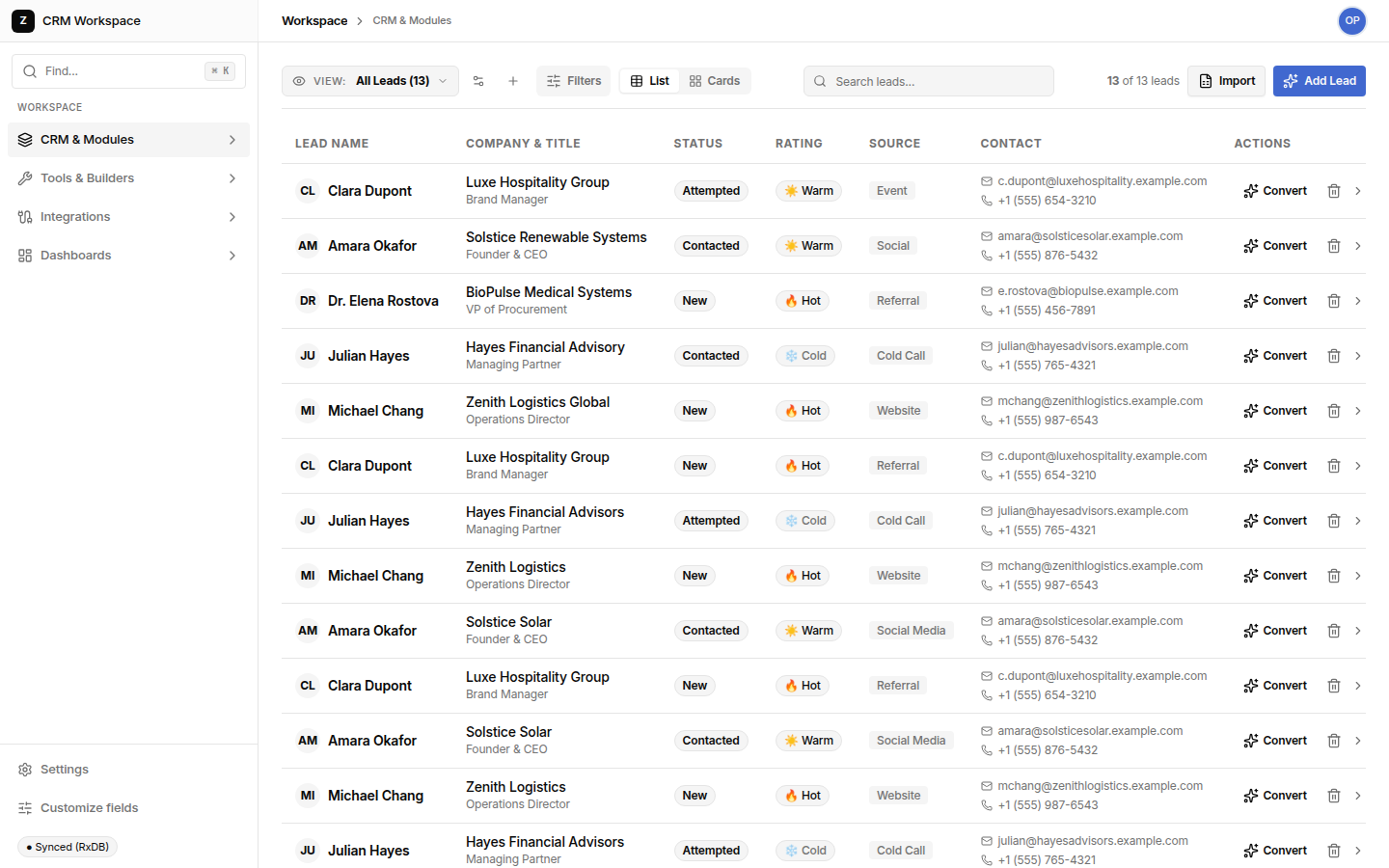
The Leads module is your operational intake gate. It collects raw, prospective inquiries from website forms, trade shows, referrals, and outbound campaigns—keeping unverified inquiries isolated from your active revenue pipeline until qualification criteria are verified.
Operational Tip: When converting leads, specify an accurate Expected Closing Date. The system uses this date to generate pipeline velocity reports and automated follow-up reminders.
Key Features & Capabilities
Everything your business development team needs to capture, evaluate, and convert prospective customers:
| Feature | How It Works | Operational Value |
|---|---|---|
| Multi-Channel Ingestion | Captures leads from Form Studio, external webhooks, CSV imports, or manual entry | Prevents valuable prospective buyer inquiries from falling through the cracks |
| Temperature Ratings | Assigns Hot (🔥), Warm (☀️), or Cold (❄️) priority indicators | Ensures sales development reps focus on the highest-yield buyers first |
| Multi-Facet Filter Drawer | Filter instantly by status, lead source, industry sector, and custom attributes | Enables segmented outreach campaigns and targeted territory follow-ups |
| Atomic One-Click Conversion | Converts qualified leads into an Account, Contact, and Deal simultaneously | Eliminates duplicate data entry and creates clean relational audit trails |
Leads Module Alternatives Comparison
How SHPI Lead Management compares against other methods of managing prospect intake:
| Intake Capability | SHPI Leads | HubSpot / Salesforce Leads | Shared Spreadsheets | Standalone Form Tools |
|---|---|---|---|---|
| Lifecycle Separation | Clear distinction between raw leads and active sales pipeline | Rigid lead-to-opportunity flows with excessive required fields | All rows mixed together; no lifecycle stage enforcement | Only stores responses; no CRM or sales pipeline integration |
| Conversion Speed | Instant 1-click modal creating Account + Contact + Deal | Multi-step wizard requiring multiple page loads | Manual retyping into separate customer and deal tabs | Requires Zapier/Make automations that break frequently |
| Source Attribution | Tracks exact intake form, campaign source, and referral partner | Locked behind expensive enterprise marketing hub tiers | Inconsistent notes entered by different reps | Isolated in form submissions table with no sales tracking |
| Data Hygiene & Duplication | Deduplicates company accounts and primary contact emails automatically | Requires complex deduplication rules or expensive add-ons | Duplicate rows and outdated phone numbers run rampant | Creates new unlinked submission rows on every entry |
The 4-Step Lead Conversion Flow
When a sales development representative qualifies a prospect, clicking Convert Lead launches an atomic transformation that prepares your sales team for closing:
| Phase | Action Performed | Result in Workspace |
|---|---|---|
| 1. Review Details | Verify contact phone, email, and company budget in the slide-out drawer | Ensures high data hygiene before pipeline entry |
| 2. Set Deal Value | Input estimated contract value and initial target closing timeframe | Automatically calculates weighted revenue in executive forecasts |
| 3. Execute Conversion | Click "Convert Lead" in the confirmation dialog | Atomic creation of Account, Contact, and Stage-1 Sales Deal |
| 4. Account Handoff | Opportunity appears directly on the Deals Kanban board | Sales executive can immediately schedule demo or send quotation |